Canon Camera Connect vs Shutter+
Is the Official App Good Enough?
I’ve been shooting Canon since the early 2000s, starting out on film long before “connectivity” meant anything more than a hot shoe. These days I shoot with a Canon EOS R5, and somewhere in the move from film to digital, a phone app quietly became as essential to my kit bag as a spare battery.
For years I’ve used both apps in this comparison. Canon Camera Connect is the free, official app that comes recommended in every EOS manual. Shutter+ is the third-party app I bought in April 2023, right when I upgraded to the R5, initially on an annual plan, then later switched to a lifetime licence because I simply didn’t want to be without it. This isn’t a spec-sheet comparison written from a press release — it’s what actually happens when you’re standing in a field at golden hour, camera on a tripod thirty feet away, waiting for the light to turn and hoping your phone hasn’t quietly lost the connection.
So, is Canon’s official app good enough? For a lot of photographers, yes. For others, no. In this article, I give a full breakdown of the two to help you decide which is the best remote app for you to use on your Canon camera.
The quick answer:
Canon Camera Connect is free, works on both iPhone and Android, and is a genuinely solid basic wireless remote and photo transfer tool. Its biggest weakness is connection stability — it’s prone to dropping out, especially over longer sessions. Shutter+ costs money (from $3.49/month or a one-off $65 lifetime licence) but stays connected far more reliably, and adds a proper intervalometer, exposure bracketing, a precise BULB timer, and composition and exposure tools that Canon’s app simply doesn’t have. The catch: Shutter+ is iOS-only, so if you’re on Android, this decision is already made for you.
What Is Canon Camera Connect?
Canon Camera Connect is Canon’s own free companion app, built to link your camera to your phone over Wi-Fi or Bluetooth. It’s developed and maintained directly by Canon Inc., which means it’s the app that ships in the box, metaphorically speaking, for anyone who’s bought a Wi-Fi-enabled EOS camera in the last decade.
At its core it handles three jobs: transferring photos and video from camera to phone, remote shooting with a live view feed, and keeping your camera’s firmware current without needing a computer. On compatible cameras it can also pull GPS data from your phone to geotag your images, and it’ll hand images off to sister apps like Digital Photo Professional Express or the Canon Print app when you want to edit or print.
It’s available for both iPhone and iPad and Android, currently sits at version 3.5, and holds a genuinely impressive 4.8 out of 5 from more than 137,000 App Store ratings. Worth keeping in mind, though: that figure reflects every Canon owner who’s ever used it for a quick photo transfer — it’s not specifically a verdict from people relying on it for demanding remote-shooting sessions, which is where the cracks start to show, as I’ll get into below.
You can find it on the official Canon Camera Connect page.
What Is Shutter+?
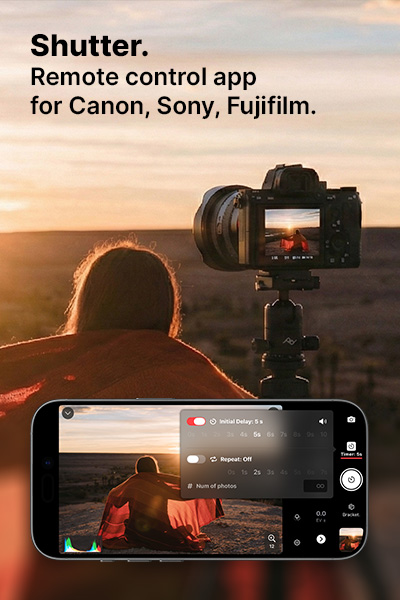
Shutter+ is a third-party remote control app from Camera Control Apps, a small independent studio in Poland run by a couple, Kalina and Grzegorz, who by their own account built the first version as a way to get better photos of themselves while travelling. It’s since grown into a genuinely deep tool that now covers Canon, Sony, and Fujifilm cameras, with the Canon version built specifically around EOS and PowerShot bodies. I wrote a bit more about the app’s recent interface overhaul when Camera Control Apps rolled it out.
Unlike Canon’s app, Shutter+ is iPhone, iPad, and Apple Watch only — there’s no Android version. It’s also a paid app: you get a 7-day free trial, then it’s $3.49 a month, $24.99 a year, or $65 as a one-off lifetime purchase (prices in USD — check the App Store for pricing in your own currency). One licence covers every compatible camera you own across all three supported brands, on every Apple device signed into your Apple ID, including Family Sharing.
What makes Shutter+ better overall is the features Canon never built: a proper intervalometer, exposure bracketing, a timed BULB mode, and a full set of exposure and composition tools — histogram, zebra stripes, false colour, focus peaking, and LUT preview — that turn your phone into something closer to an external monitor than a glorified remote trigger. It’s picked up solid independent coverage too, with positive write-ups from DIY Photography, Digital Camera World, and Fstoppers, all of whom rated it well ahead of manufacturer apps on reliability and depth.
Feature Comparison: Canon Camera Connect vs Shutter+
| Feature | Canon Camera Connect | Shutter+ |
|---|---|---|
| Price | Free | 7-day free trial, then $3.49/mo, $24.99/yr, or $65 lifetime |
| Platforms | iOS, iPadOS, Android | iOS, iPadOS, Apple Watch (no Android) |
| Connection type | Wi-Fi, Bluetooth, USB cable (fewer cameras on iPhone than Shutter+ | Bluetooth (used to start the Wi-Fi), Wi-Fi direct, USB cable |
| Connection stability | Frequently reported disconnects | Built to stay connected through app-switching and lock screen |
| Remote shutter release | Yes | Yes |
| Live view on phone | Yes | Yes |
| Manual exposure control | Basic | Full — shutter speed, aperture, ISO, exposure comp, white balance, drive mode |
| Intervalometer | No | Yes, with optional refocus between shots |
| Exposure bracketing | No | Yes, configurable brackets and EV step |
| Focus bracketing | No. Manual workaround only, via tap-to-focus between shots | Some models, or manual workaround, via tap-to-focus between shots |
| BULB timer | Basic bulb trigger only | Precise timed BULB, combinable with the intervalometer |
| Burst shooting control | No dedicated tool | Yes |
| Composition overlays | No | Rule of thirds, golden ratio, diagonal, Fibonacci spiral, aspect ratio preview, custom overlays |
| Histogram / zebra / false colour / focus peaking / LUT preview | No | Yes, all included |
| Photo import & filtering | Basic transfer | Filter by date, rating, or file format; dual card-slot switching |
| Video remote start/stop | Yes | Yes, with recording timer |
| Apple Watch app | No | Yes |
| Firmware updates via app | Yes | No |
| GPS geotagging | Yes (via phone) | No |
| App Store rating | 4.8/5 (137K+ ratings) | 4.4/5 (69 ratings on the Canon-specific listing) |
A quick note on that last row: Canon Camera Connect’s rating reflects a vastly larger, more casual user base — it’s the default app for millions of EOS owners. Shutter+’s rating comes from a much smaller, self-selected group of people who chose to pay for it. Neither figure tells the whole story on its own, which is really the point of this article.
The Biggest Difference: Connection Reliability
If there’s one issue that comes up again and again in Canon Camera Connect reviews — and in my own experience — it’s the connection dropping out. Recent App Store reviews describe the camera disconnecting within minutes even when the phone never leaves arm’s reach, forcing a trip back into the camera’s Wi-Fi menu to reconnect. It’s not just anecdotal, either: Canon added a requirement to sign in with a Canon ID before you can use core features like remote shooting, a change some users have found frustrating precisely when they’re out of signal range — which, for landscape and outdoor photographers, is often exactly when you need the app most.
Shutter+ takes a different approach. It connects over Wi-Fi Direct — your camera creates its own private network rather than leaning on a router — and it’s genuinely quick to pair, with enough range to trigger the shutter from well across a room or a field. It’s also built to stay connected while you switch apps or lock your phone, which sounds like a small thing until you’re the one standing in a field, glancing at messages while you wait for the light, and don’t want to start the pairing process over again. The developer also ships updates often — sometimes several times a month — and a good number of recent releases have specifically targeted connection reliability and clearer error messages when something does go wrong.
The Features Canon Camera Connect Doesn't Have
This is really where Shutter+ separates itself. Canon Camera Connect covers the basics — remote shutter release, live view, basic exposure adjustment — and then stops. Shutter+ builds on that foundation with tools aimed at photographers who want more control over the shot:
- Intervalometer — set a number of shots and the interval between them, with the option to have the camera refocus before every single shot. I use this constantly for self-portraits, where being able to shift pose slightly between frames — with the camera refocusing on me each time — is the difference between one usable shot and a whole sequence to choose from.
- Exposure bracketing — set the number of exposures and the difference between them, then tap once; Shutter+ fires the whole sequence for you rather than you clicking a cable release for each frame. I rely on this for scenes with a big range between highlights and shadows, and because you’re tapping the phone screen rather than touching the camera, there’s less chance of movement between exposures. I walk through the full workflow in my exposure bracketing and lens flare removal tutorial.
- Focus stacking, done manually — a dedicated automated focus bracketing tool isn’t available on most of the Canon range through the app, but you can still get there: take a series of shots and use tap-to-focus on your phone to shift the focus point between each one. Because you’re never touching the camera itself, there’s essentially zero movement between frames, which is exactly what you want for a clean stack in post.
- A proper BULB timer — set an exact duration and the app holds the shutter open for precisely that long. You can combine it with the intervalometer for things like star trail sequences.
- A time limit on continuous shooting — cap a burst at a set number of frames, or just tap to start and tap again to stop, instead of holding the shutter down and hoping you release it at the right moment.
- Composition and exposure tools — histogram, zebra stripes, false colour, focus peaking, and LUT preview, all overlaid on the live view feed, rather than just a bare video stream.
None of these exist in Canon Camera Connect at all, at any price. They’re simply not features Canon has built into the free app.
One Big Catch: Platform Availability
The biggest downside to Shutter+ is that sadly it’s iOS only — iPhone, iPad, and Apple Watch, with no Android version and none announced. If you shoot Canon on an Android phone, this comparison is largely academic: Canon Camera Connect is your only wireless remote option, full stop, and it’s genuinely good at that basic job.
For iPhone and iPad shooters, the choice is real, and it comes down to how much you value the extra reliability and features against the fact that one app is free and the other isn’t.
Price: Free vs Paid
Canon Camera Connect costs nothing, which is obviously hard to argue with. Shutter+ offers a 7-day free trial, after which it’s $3.49 a month, $24.99 a year, or $65 as a one-time lifetime purchase. A single Shutter+ licence covers every supported camera you own — Canon, Sony, or Fujifilm — and works across all your Apple devices under one Apple ID, Family Sharing included.
If you only ever reach for a remote app occasionally, that’s real money for something Canon gives away. But if you shoot regularly, and the extra features save you re-shoots, wasted trips, or missed light, it pays for itself fairly quickly. I went from an annual subscription to the lifetime plan for exactly that reason.
My Experience: From a One-Year Subscription to a Lifetime Plan
I bought Shutter+ when I upgraded to my R5 a few years ago, initially on the annual plan. That was enough time to know I wasn’t going anywhere — the intervalometer alone has saved more shoots than I can count, and having a live histogram on my phone rather than squinting at the camera’s rear screen has become second nature. After that first year, I got in touch with the developer to ask about switching to the lifetime licence. They were quick, friendly, and genuinely helpful about making the switch happen, which is a level of service I don’t think I’ve ever had from a big manufacturer’s support desk.
Self-portraits used to be a proper guessing game. I’d manually focus on a spot in the scene, set the camera’s 10-second timer, and sprint into position — often needing several attempts to actually land in the right place, in focus. With Shutter+, I can walk into the scene, watch it all live on my phone, choose exactly where I want to stand in the frame, tap to focus precisely on myself, then set just enough delay to pocket the phone and settle into a natural pose. It’s changed how I approach every landscape shot I want to be in.
I’ve used Canon Camera Connect plenty too, and to be fair to Canon, it does what it says on the tin. For quick jobs — triggering the shutter from across a room, checking a shot on a bigger screen than my camera’s LCD, grabbing a couple of images to share before I’ve even got home — it’s genuinely good. My real frustration has always been how quickly it drops the connection. Set it up, wait for the light to shift the way you want it, and by the time it does, you’re often reconnecting from scratch. Shutter+, by comparison, just stays connected — I can put my phone in my pocket to adjust something on the camera, and it’s still connected when I pull it back out.
Who Should Use Canon Camera Connect?
- You shoot on Android
- You want an occasional wireless trigger and a bigger live view screen than your camera’s built-in display
- You mainly use it for firmware updates and quick photo transfers
- You don’t need advanced shooting modes like bracketing or an intervalometer
- Budget is the deciding factor and you’re not shooting remotely often enough to justify a paid app
Who Should Use Shutter+?
- You shoot on iPhone or iPad and remote control is a regular part of how you work, not an occasional extra
- You take self-portraits or group shots and want several frames to choose from — so nobody’s caught blinking — with reliable refocusing between each one
- You do long exposure, astrophotography, or time-lapse work and want a precise BULB timer and intervalometer
- You do landscape, real estate, or product work where exposure bracketing matters
- You’ve been caught out by a dropped connection at exactly the wrong moment
- You want composition and exposure tools such as histogram, grids, focus peaking built into your remote
So, Is Canon Camera Connect Good Enough? My Verdict
Genuinely, yes, for a specific kind of user. If you want a straightforward, no-cost wireless remote to trigger your camera from a distance and preview your shot on a bigger screen than your camera’s LCD, Canon Camera Connect does that job well. It’s also your only option if you’re on Android, and it’s the one you need for firmware updates no matter what else you use.
Where it stops being good enough is the moment your shooting gets more deliberate: self-portraits and group shots that need several attempts, long exposures and astrophotography where a precise BULB timer matters, bracketed sequences for landscapes or real estate, or any situation where you genuinely can’t afford the connection to drop at the wrong moment. That’s the gap Shutter+ is built to fill, and in my experience, it fills it well.
My own kit bag has room for both. Canon Camera Connect stays on my phone for firmware updates and the odd quick transfer. Shutter+ is what I actually open when I’m setting up a shot I care about.
Ready to decide for yourself?
Frequently Asked Questions
Is Canon Camera Connect free?
Yes. It's a completely free app from Canon Inc., with no in-app purchases required for any of its core features. Since a March 2025 update, though, you do need to sign in with a Canon ID to use remote shooting and other core features, which can be a problem if you're somewhere without signal.
Does Shutter+ work on Android?
No. Shutter+ is built exclusively for iPhone, iPad, and Apple Watch. Android users currently have no choice but to use Canon Camera Connect for wireless remote control.
Does Shutter+ work with the Canon EOS R5?
Yes. The R5, R5 Mark II, R5 C, and the rest of the current EOS R range are all supported, alongside a long list of older EOS DSLR and mirrorless bodies and several PowerShot models. It's worth checking the full compatible camera list for your specific model, as some older cameras have more limited feature support.
Why does Canon Camera Connect keep disconnecting?
It's a widely reported issue, not something unique to one camera or phone. Recent reviews point to the camera dropping its Wi-Fi connection after short periods of inactivity, and some users have also linked connection trouble to the newer Canon ID sign-in requirement. In my own experience, it's frequent enough that I stopped relying on it for anything where I needed to wait around for the right moment.
Is Shutter+ worth paying for?
If you use a remote app occasionally, probably not — Canon Camera Connect will cover you. If you regularly shoot self-portraits, long exposures, time-lapses, or bracketed sequences, or you've been caught out by a dropped connection at the wrong moment, I'd say yes. I switched to the lifetime plan after a year and haven't looked back.
Do I need to keep Canon Camera Connect if I buy Shutter+?
I'd suggest keeping it installed for one job Shutter+ doesn't do: firmware updates. Beyond that, most of my remote shooting now happens entirely in Shutter+.
Does Shutter+ drain your phone's battery?
Less than you'd think. Running any live view feed for a while will use some power, but Shutter+ is built to keep consumption down, and for long sequences like timelapses or astrophotography, you can lock your phone's screen entirely — the app keeps running in the background and still shows your progress when you check back in.
Can I switch from a Shutter+ subscription to the lifetime plan later?
Yes. You cancel your existing subscription first, then purchase the lifetime licence from the payment screen inside the app. That's exactly the route I took, and the developer was helpful when I had questions about it.