If there’s one question that comes up time and again — in photography forums, in workshops, from students I’ve taken out into the field — it’s this one. RAW or JPEG? And it’s a fair question, because the answer genuinely depends on what kind of photography you’re doing and what you want to achieve with your images.
I’ve been shooting RAW for years, and I’m a firm believer in what it can do for your photography. But that doesn’t mean JPEG has no place — it absolutely does, under the right circumstances. In this article I’ll break down the differences, address a few myths along the way, and help you decide which approach suits your shooting style.
So what actually is RAW?
A RAW file is the pure, unprocessed data captured by your camera’s sensor the moment you press the shutter. Think of it as a digital negative. The sensor records everything — every photon of light, every shadow, every subtle colour gradient — and writes it to the card without applying any processing whatsoever. No sharpening, no contrast adjustments, no colour science. Nothing. It’s just the raw data, waiting for you to develop it.
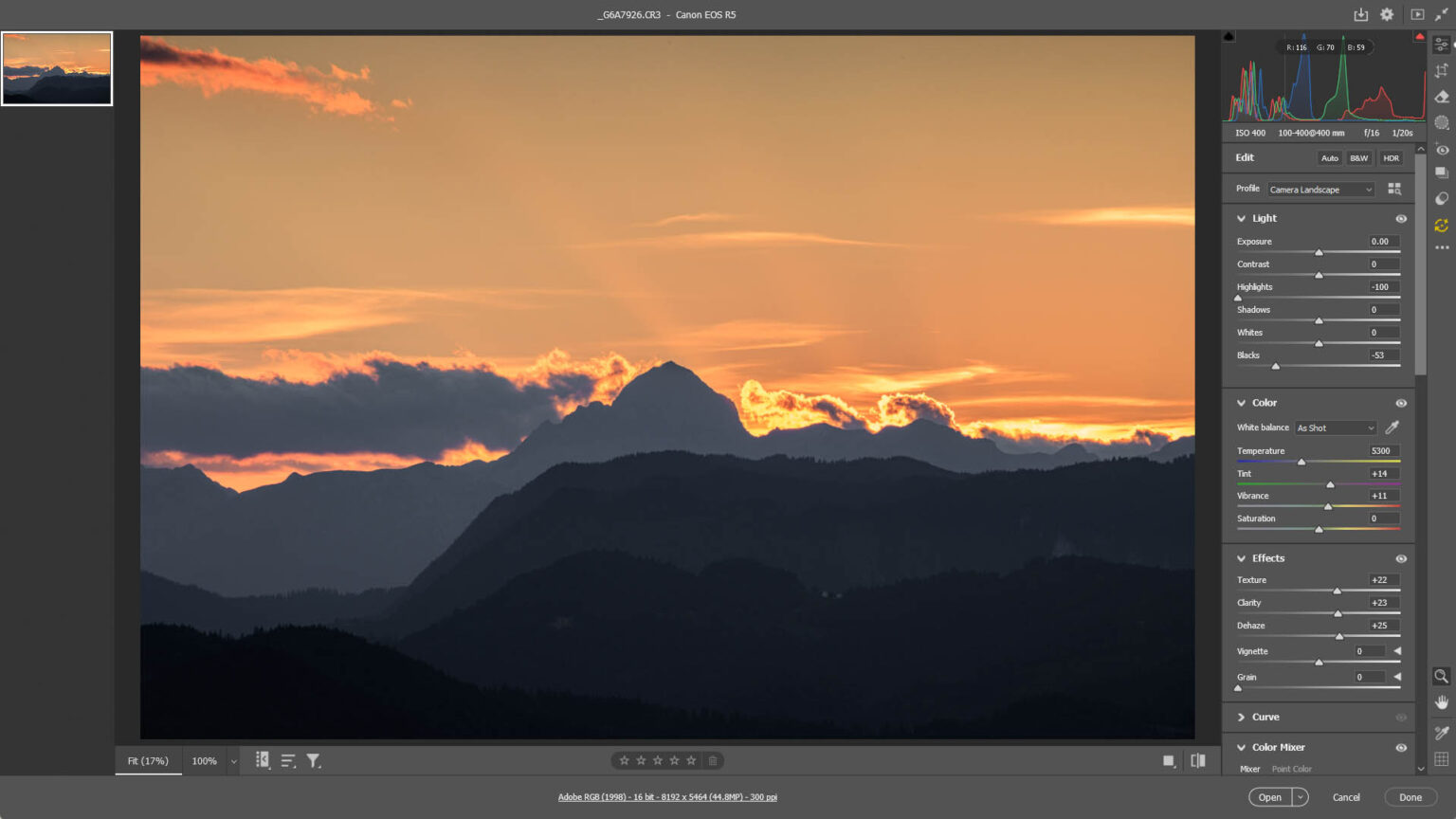
RAW files are considerably larger than JPEGs, and you need dedicated software to work with them — I use Adobe Camera RAW, which is built into Photoshop, though Lightroom is another popular option. The reward for that extra storage and processing step is exceptional control over the final image.
And JPEG?
JPEG is what most cameras default to, and most people are already familiar with the format. When you shoot JPEG, the camera takes the raw sensor data, processes it internally — adjusting white balance, contrast, colour saturation, sharpening and noise reduction — and then compresses everything down into a much smaller file. The result is a ready-to-use image that you can share, print or upload without touching a computer.
But here’s the thing, and this is important: a JPEG is not an unedited photograph. It has been edited — by the camera’s own software, automatically, without any input from you. Every decision about how your image looks has been made by an algorithm inside the camera, calibrated to appeal to a general audience. You’ve simply handed control of that process to the manufacturer.
“Editing is cheating” — let’s put that to rest
I’ve written about this before, but it’s worth revisiting in the context of RAW vs JPEG because the two subjects are deeply connected. The SOOC (Straight Out Of Camera) camp will tell you that a JPEG taken straight from the camera is the only “true” photograph, and that editing your images — particularly RAW files — is somehow dishonest.
I genuinely understand where this instinct comes from. There’s a romanticism attached to the idea of capturing a perfect moment exactly as it appeared, untouched by any post-processing. But the reality is that every digital image is processed. When you shoot JPEG, the camera applies noise reduction, sharpening, colour rendering and tone mapping on your behalf. That is editing. It’s just editing you weren’t involved in.
The analogy I always come back to is the darkroom. The great film photographers — Ansel Adams among them — spent hours in the darkroom dodging and burning prints, adjusting exposure times, choosing different paper grades to change contrast. Nobody called that cheating. It was craft. Digital post-processing is the modern equivalent.
In fact, I’d argue that a carefully edited RAW file often ends up looking more natural than a camera-processed JPEG. The camera makes generalised assumptions; you know what you were looking at, what the light felt like, what you were trying to convey. When you process a RAW file yourself, you’re making informed, creative decisions about the image you actually took. That’s not cheating. That’s photography.

RAW or JPEG at a glance
| Feature | RAW | JPEG |
|---|---|---|
| File size | Large (20–80 MB+) | Small (2–10 MB) |
| Editing flexibility | Maximum | Limited |
| Ready to share | No – requires processing | Yes, immediately |
| Shadow/highlight | Exceptional recovery | Little or none |
| White balance | Fully adjustable in post | Baked in at capture |
| In-camera processing | None applied | Applied automatically |
| Best for | Landscapes, portraits, portfolio | Events, news, sport |
Shoot RAW: when creative control matters most
For my own photography — primarily landscapes, long exposures, and travel — RAW is almost always the right choice. When I’m standing on a hillside at dawn with a high-contrast scene in front of me, I know the camera’s JPEG engine isn’t going to handle it as well as I can. I want to recover those highlights in the sky. I want to lift the shadows in the foreground. I want full control over how the colours render.
RAW is the sensible choice when:
- You’re shooting in difficult or unpredictable light where you’ll need latitude to correct exposure in post
- Image quality is a priority — portfolio shots, client work, print sales, competitions
- You’re doing landscape photography, where dynamic range recovery is often essential
- You want precise control over white balance, colour grading and local adjustments
- You’re shooting portraits where accurate skin tones matter
The downside, and I won’t pretend it isn’t one, is time. RAW files need processing before they’re usable. If you come back from a shoot with three hundred RAW files, you’ve got a significant editing session ahead of you. That’s a real commitment, and it’s not for everyone or every situation.
Shoot JPEG: when speed is everything
There are plenty of situations where JPEG is not just acceptable but the right professional choice. If you’re a news or sports photographer filing images to a picture desk minutes after they were taken, you don’t have time to sit down with Photoshop. If you’re photographing a busy event and your client needs a hundred images delivered the same evening, JPEG is your friend.
Experienced photographers who shoot in JPEG often get excellent results because they’ve put the work in upfront — dialling in their white balance accurately, setting the right picture profile for the conditions, and getting the exposure right in camera. In those cases, the JPEG output can be genuinely impressive.
JPEG works well when:
- Speed of delivery is critical — news, sport, press photography
- You’re shooting a high-volume event and need to minimise post-processing time
- Storage space is a genuine constraint
- You’re confident in your in-camera settings and the light is consistent
- The images are headed for social media and ultimate quality isn’t the primary concern
Shoot RAW + JPEG: the best of both worlds
Most modern cameras — and certainly anything above entry-level — let you record both a RAW file and a JPEG simultaneously for every shot. It uses more card space, but in many scenarios it’s the smartest option available.
I’d particularly recommend this approach if you’re still learning. Having both files to compare is one of the most instructive exercises I know. Look at the camera’s JPEG, then open the same image as a RAW file in Adobe Camera RAW and see how differently the data can be interpreted. You start to understand what the camera decided, and why you might decide differently. Over time, that understanding fundamentally changes how you shoot.
RAW + JPEG makes sense when:
- You’re learning, and want both a reference image and the flexibility to edit
- You need fast turnaround on some shots but want to properly edit the best ones later — wedding photographers often work this way
- You want a backup. If time runs short, the JPEGs are always there as a deliverable fallback
- You want a visual benchmark — the JPEG tells you what the scene looked like, which can be useful when editing the RAW later
What I actually do
I shoot RAW almost exclusively. For landscape and travel photography, the latitude that a RAW file gives me in post-processing is simply too valuable to give up. Scenes with extreme dynamic range — a bright sky against deep shadow, backlit subjects, the sun low on the horizon — these are situations where I know a JPEG is already throwing away data I might need.
I also think the editing process itself is part of the photography. Looking at a RAW file and deciding how it should look, how much of the shadow detail to reveal, how warm or cool the colour temperature should be, whether the image calls for restraint or something more dramatic — all of that is part of realising the photograph. I’d no more hand that over to the camera than I’d let someone else choose my composition.
That said, when I’m photographing something where speed matters — or when I know a client needs images quickly — I’ll switch to RAW + JPEG and use the JPEGs for the fast turnaround while keeping the RAWs for anything I want to present at its best.
My Canon workflow — RAW, always RAW
I’ve shot Canon my entire digital career, and RAW has been my format of choice throughout. For years I used the Canon 5Ds — a 50-megapixel DSLR that produced extraordinary detail but also enormous files, which only reinforced the case for RAW. Having that much data to work with made proper processing not just desirable but essential. I now shoot with the Canon R5, Canon’s mirrorless flagship, and the jump in dynamic range and colour depth from the 5Ds generation has been remarkable.
Canon RAW files come in two formats depending on your body: CR2 from the older DSLRs, and CR3 from the R-series mirrorless cameras. Both open beautifully in Adobe Camera RAW — the RAW processing engine built into Photoshop, and the tool I’ve used for editing throughout. ACR gives you complete access to everything the sensor captured: the highlights you can rein in, the shadows you can open up, the white balance you can shift entirely after the fact. For the kind of landscape photography I do — where the sky is often three or four stops brighter than the foreground — that latitude isn’t a luxury. It’s the difference between a salvageable image and a lost one.
My typical workflow is straightforward: shoot in RAW, import into Adobe Camera RAW via Photoshop, make my global adjustments — exposure, white balance, highlights, shadows, colour grading — and then bring the image into Photoshop itself for any more detailed local work. The R5’s CR3 files are also noticeably more efficient than the old CR2 format, which helps on a long day when both card slots are filling up. But the fundamental reason to shoot RAW hasn’t changed since my 5D days: it gives you the material to make the image you had in mind, rather than settling for what the camera decided on your behalf.
Common questions
Is RAW always better than JPEG?
Not always. It’s better for editing flexibility and quality, but JPEG is better when you need speed and convenience. The right answer depends on what you’re doing and what matters most in that situation.
Will shooting RAW make me a better photographer?
Learning to process RAW files will certainly deepen your understanding of exposure, colour and light. But a poorly composed or badly exposed RAW file won’t become a great image just because you’ve opened it in Adobe Camera RAW. Getting it right in camera still matters — RAW just gives you more room to work with when processing.
Can I convert a JPEG to RAW?
No. Once the camera has discarded the raw data to create a JPEG, that information is gone. You can open and edit a JPEG, but you can’t recover the dynamic range or tonal information that a RAW file would have retained. This is why getting into the habit of shooting RAW matters so much — you only get one chance.
What if I don’t have time to edit all my RAW files?
This is a genuine practical concern. My suggestion: shoot RAW + JPEG so you always have a usable JPEG, then edit the RAWs selectively — only the images that genuinely warrant the time investment. You don’t have to edit every single shot. Keep the RAWs archived in case you want them later; storage is cheap.
What should beginners shoot?
I’d recommend RAW + JPEG from the start. The JPEG gives you an immediately usable image; the RAW gives you the material to learn from. As you get more comfortable with editing and start to develop your own visual style, you’ll naturally gravitate towards one approach or the other — or you’ll keep using both, depending on the shoot.
The bottom line
RAW and JPEG are tools, not religions. Neither format is inherently superior — it entirely depends on what you’re shooting, who the images are for, and what role you want post-processing to play in your work.
What I would push back against is the idea that JPEG is somehow more “authentic.” A JPEG is an image that’s been processed by a camera algorithm. A RAW file edited by the photographer who took the picture — someone who was actually there, who knows what they saw — is, if anything, a more honest representation of that moment.
Shoot RAW when quality and creative control matter. Shoot JPEG when you need speed. Shoot both when you want flexibility. And whichever you choose, learn to get it right in camera first — the format you shoot in doesn’t compensate for poor light, poor composition or poor exposure.
It never has.